How Visualization Helps Unblock the AI Coding Bottleneck
 HeavybitHeavybit
So, AI Generated Lots of Code. What Does any of it Do?
For years, the all-consuming measurement of effective software development has been “developer productivity,” the ability of a team to deliver as much high-quality code as quickly as possible. Thanks to advances in AI-powered code generation tools, delivering large quantities of code quickly is now less of an issue.
But there are new bottlenecks. As AI tools spin up millions of lines of seemingly “good enough” code, the bottleneck has shifted to reviewing it. With the cost of generating code already approaching zero, one of the biggest future challenges in software may simply be understanding it. As new engineers enter the workforce and existing ones move on to new projects, they will inherit entire codebases that were not written by human hands.
To help humanity navigate this new future, a team of graduate students (Amir Amangeldi, Felix Wang, and Allen Zhang) set to work on building Noodles, an open-source project that helps users understand the reasoning behind different code branches with visual abstract syntax tree (AST) parsing. Below, the team explains why they built the project and what comes next.
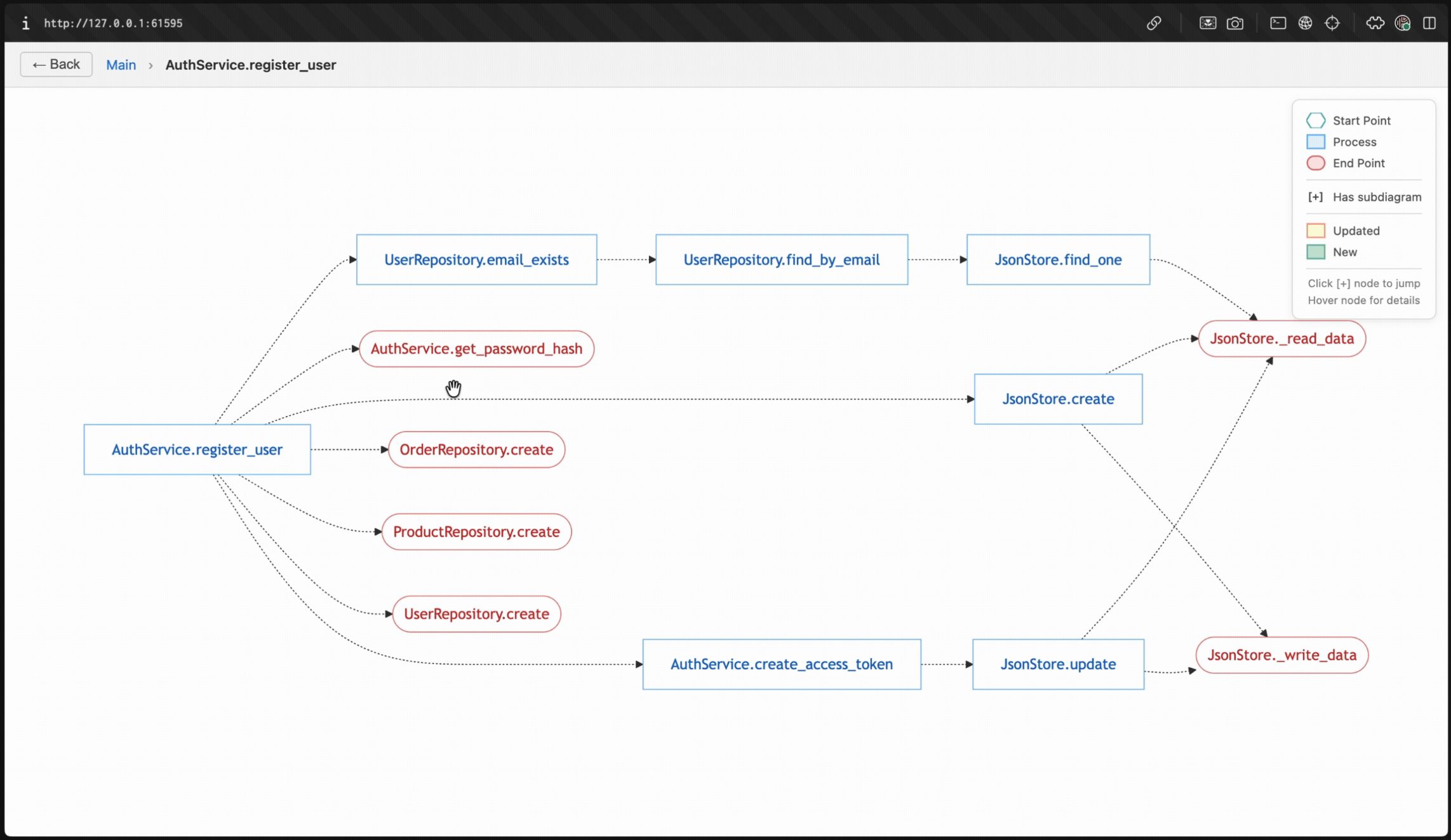
The Noodles project visualizes what each branch of a repo does with AI-generated annotation. Image courtesy Unslop
The New Bottleneck: Understanding AI-Generated Code
The Noodles team is blunt. “The fundamental problem [in AI coding today] is that parsing AI output is hard.” The three creators explain that each of them relies heavily on AI tools like Claude Code these days, but have found it increasingly difficult to find time to review every last line of AI-generated code.
“We felt that we needed a higher level of abstraction to review changes. So we thought: Why not create diagrams that visualize what the changes are at a higher level?” The Noodles project emerged as a way to represent that abstraction, essentially as an additional, visual layer that stays updated as the codebase changes.
“Understanding AI-generated code, that’s 100% the bottleneck,” says the team. “And when we say ‘understanding code,’ that entails reviewing, asking critical questions, making probing assumptions, and testing. Which is harder to do.” Admittedly, it’s possible to delegate code review-related tasks to agents now, but that also effectively delegates away the ability to understand AI-reviewed code, to say nothing of how detailed or granular the picture could or should be.
“The other bottleneck is: As you scale and have more output, perhaps you are able to grasp what's happening. But how do you coordinate the different coding agents that are working for you at the same time? How do you keep track of the context of what's happening at any given point on your behalf?” Beyond the immediate issue of understanding what a specific code branch does, there’s a second, broader gap in trying to understand the larger context across everything your agents are doing.
Using Deterministic Tooling for Visualization
The Noodles team admits that their initial spec, which utilized LLMs for visualization, didn’t quite work out as planned. “To be frank, the output was different every time, which became difficult to track. So we thought: How can we make this as deterministic as possible?”
The team landed on AST parsing as an alternative. “It’s fully deterministic. Of course, it's not perfect, but it's able to go through classes and functions, and understand what's calling what consistently, and then represent that on a diagram.” The Noodles project was built to output a visual graph that displays connections across various functional nodes to explain what each connection means, and summarize changes at the PR and branch levels. It uses AI to group nodes together to arrive at higher-level diagrams as well as to enhance nodes and edges with helpful descriptions.
The team notes that the project was otherwise engineered around simplicity, leading to three different node designations for input entry points, process points (encompassing either individual functions or aggregate processes), and outputs, utilizing Mermaid diagrams, which turned out to be more popular than D2 diagrams.
Real-World Use Cases (and Limits) of Visualization
The team notes that the project is seeing the most use in collaborative settings among teams where not everyone has been exposed to new code or changes. “For teams that are still using pull requests, [Noodles seems like an] entry point that's helpful, specifically for large changes. That's the point where people want to understand ‘what happened.’”
“And that's why we have a free GitHub integration where you can integrate our unslop bot into your repository, and then analyze it, just like you would with a regular code review agent. Running an analysis spits out a link that you can click to see a diagram pertaining to the changes in this particular PR. So that's the dominant use case.”
The team notes that in the grand scheme of things, onboarding is one of the most important use cases that requires more understanding. “Passing on the foundational understanding of what’s been done before is absolutely key, so for learning in general, there’s absolutely going to be space for that in education.”
“However, architectural diagrams on the cloud level are probably not going to go away. The further you zoom out for a complex system that has multiple different servers, databases, and whatnot…those types of diagrams are here to stay. But for code-level diagrams, it’s not as certain.”
“It’s really a question of how we can adapt fast-moving AI tools for humans, whether they're developers or vibe coders or any other sort of human using AI. And there's definitely [a place for] visualization, but I think the bigger problem is what level of detail is too much to ask a human. To us, that ‘level of detail’ comes down to the human judgment that needs to be applied.”
“AI can predict a lot of things. But the places where human judgment needs to be applied, that's where some level of information representation needs to be passed on to humans. Whether it's in the form of a notification, including text or a diagram that explains to the human what remains for them to decide. Whether it's concise enough and delivers information in the right shape, at the right time, with the right level of scope. That's really the problem we're going after here.”
The team notes that, over conversations with its growing community, it has started to realize the limits of visual diagrams to help people understand code. “Folks are moving so fast with AI that hardly anyone has time to consistently stop and think about what's happening. They want to continue moving as fast as AI. So, having the understanding is great, but it does slow them down.”
The team utilizes its own tool to inspect its codebase, but finds itself wanting to move faster and find bottlenecks and workarounds more quickly. “The core question we’re struggling with now is how to have that understanding while moving faster. We’re designing our next project around that question.”
How Devs, Tooling, and IDEs Will Change
“With the barrier to entry into building things becoming lower, anybody can build. So the expectations of a human interacting with these tools is going to be different too. And so, the hardcore engineering practices around what it takes to understand or debug are going to have to change. The type of human that's engaged in engineering will be different.”
The team suggests that all the talk in the headlines of organizations flattening their hierarchies due to AI isn’t just talk. “All these roles of product managers, designers, and engineers collapsing into one role in fast-moving startups is a real trend. The developer tooling of the future is going to have to be much more approachable, much more simple.”
What will the IDE of the future look like? “We don't see it being a bunch of files that you have to click through, because the sheer number of files is going to be so large. And it’s not clear that a terminal is good enough either, because the terminal is constrained in its functionality. We believe it will have to be a standalone user experience that is able to balance between the chatting, the browsing, and the visuals in a very simple, unified manner.”
“So yes, the IDE of the future is certainly going to borrow some aspects of all of the things that have come before, but it will have to fundamentally change.”
Content from the Library
What's Missing to Make AI Agents Mainstream?
2025 was to be the year of AI agents, a prediction that may or may not have come true, depending on which people you ask. For a...
How Back-End Engineering Is Evolving in the Age of AI
Where Back-End Systems Are Headed in the Age of AI While much has been written about AI’s ability to dramatically speed up...